Forever Incremental Backups
In the SaaS world, repeated full backups incur significant storage overhead, expense, and a lengthy backup window. With incremental forever backups, significantly less backup data is transferred over the network when protecting Cloud or SaaS applications.
This helps in achieving storage efficiency by avoiding the storage of multiple full backups. With the incremental forever backup policy, only the initial backup is a full backup, and subsequent backups are always incremental. Additionally, there is no performance impact on restores due to intelligent synthetization.
HYCU’s Approach to Incremental backup
An incremental backup is performed by detecting differences between the catalog of SaaS items in the current environment and those captured by HYCU in the preceding backup. This process ensures that only the changed or new data items are transferred. Crucially, this logic is implemented appropriately for each SaaS application.
HYCU’s Approach to handle backup failures
If a SaaS backup completes with failures (i.e., certain items fail to back up), those items are automatically added to the list of items to be backed up during the subsequent backup run.
HYCU’s Approach to Data Retention Management
Under the incremental forever strategy, each restore point is its own entity and will expire independently of the others. However, the backup objects that are still needed when restoring subsequent restore points must be retained. HYCU’s intelligent synthetization mechanisms aim to minimize this costly copy operation. The synthetization job is triggered separately upon each restore point expiration.
When a restore point (backup) expires, the HYCU maintenance job deletes irrelevant data blocks (containing objects) from the backup storage that are no longer required. However, it extends the expiration of the valid data blocks that are still required by newer, active backups. This ensures that a newer backup can always restore successfully, even if it uses data from an older, expired backup.
HYCU R-Cloud fully manages S3 Object Lock retention; therefore, you must disable any automatic retention settings within your S3 provider. You can achieve this by setting the retention period to manual or default, which allows the HYCU R-Cloud policy to take complete control of your data retention. This ensures a single, reliable source for all your retention policies.
How is data retention extended by HYCU?
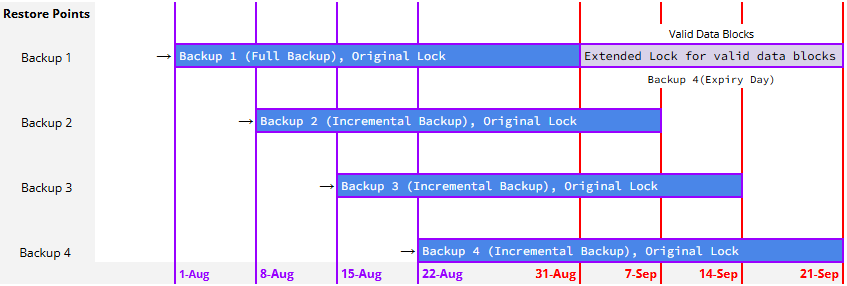
Let's use the same example to understand this better:
For instance, the HYCU policy has a 7-day RPO and a 30-day retention period.
- Backup 1: The first full backup is taken on August 1, 2025. The data is locked for the next 30 days, which is August 31, 2025.
- Backup 2: The next incremental backup is taken on August 8, 2025. The data is locked for the next 30 days, which is September 7, 2025.
- Backup 3: The next incremental backup is taken on August 15, 2025. The data is locked for the next 30 days, which is September 14, 2025.
- Backup 4: The next incremental backup is taken on August 22, 2025. The data is locked for the next 30 days, which is September 21, 2025.
When a restore point (backup) expires, the HYCU maintenance job deletes from backup storage target any data blocks that are no longer needed. However, it extends the expiration of the valid data blocks that are still required by newer, active backups. This ensures that a newer backup can always restore successfully, even if it shares data with an older, expired backup. For example, the valid data blocks from Backup 1 (taken on August 1, 2025) that are still in use by newer backups will be extended to September 21, 2025, which is the retention time of the most recent restore point, Backup 4.
SaaS Modules Supporting Forever Incremental
| R-Cloud Modules | Forever Incremental |
|---|---|
| Atlassian Confluence data protection | ✅ |
| Atlassian Jira Asset and Config Management data protection | ✅ |
| Atlassian Jira Service Management data protection | ✅ |
| Atlassian Jira Software data protection | ✅ |
| Box data protection | ✅ |
| iManage Cloud data protection | ✅ |
| Microsoft M365 Exchange Online data protection | ✅ |
| Microsoft M365 OneDrive for Business data protection | ✅ |
| Microsoft M365 SharePoint Online data protection | ✅ |
| Microsoft M365 Teams data protection | ✅ |
| GitHub data protection | ✅ |
| Microsoft Entra ID data protection | ✅ |
| GitLab data protection | ✅ |
Was this article helpful?
That’s Great!
Thank you for your feedback
Sorry! We couldn't be helpful
Thank you for your feedback
Feedback sent
We appreciate your effort and will try to fix the article